Why Your Small Business Needs a Website (Without a Hefty Price Tag)
An affordable small business website is no longer a luxury—it’s a necessity. In today’s digital marketplace, your website is your 24/7 salesperson, digital storefront, and credibility builder.
Quick Answer: Best Affordable Website Options
| Solution | Cost Range | Best For | Time to Launch |
|---|---|---|---|
| DIY Website Builders | $10-30/month | Tech-savvy owners, simple sites | Hours to days |
| Professional Design with Monthly Plans | $999 setup + $99/month | Businesses needing custom design and support | 15 days |
| AI-Powered Tools | $15-20/month | Quick setup, content generation | Same day |
| Free Plans (Limited) | $0 (with restrictions) | Testing ideas, temporary sites | Hours |
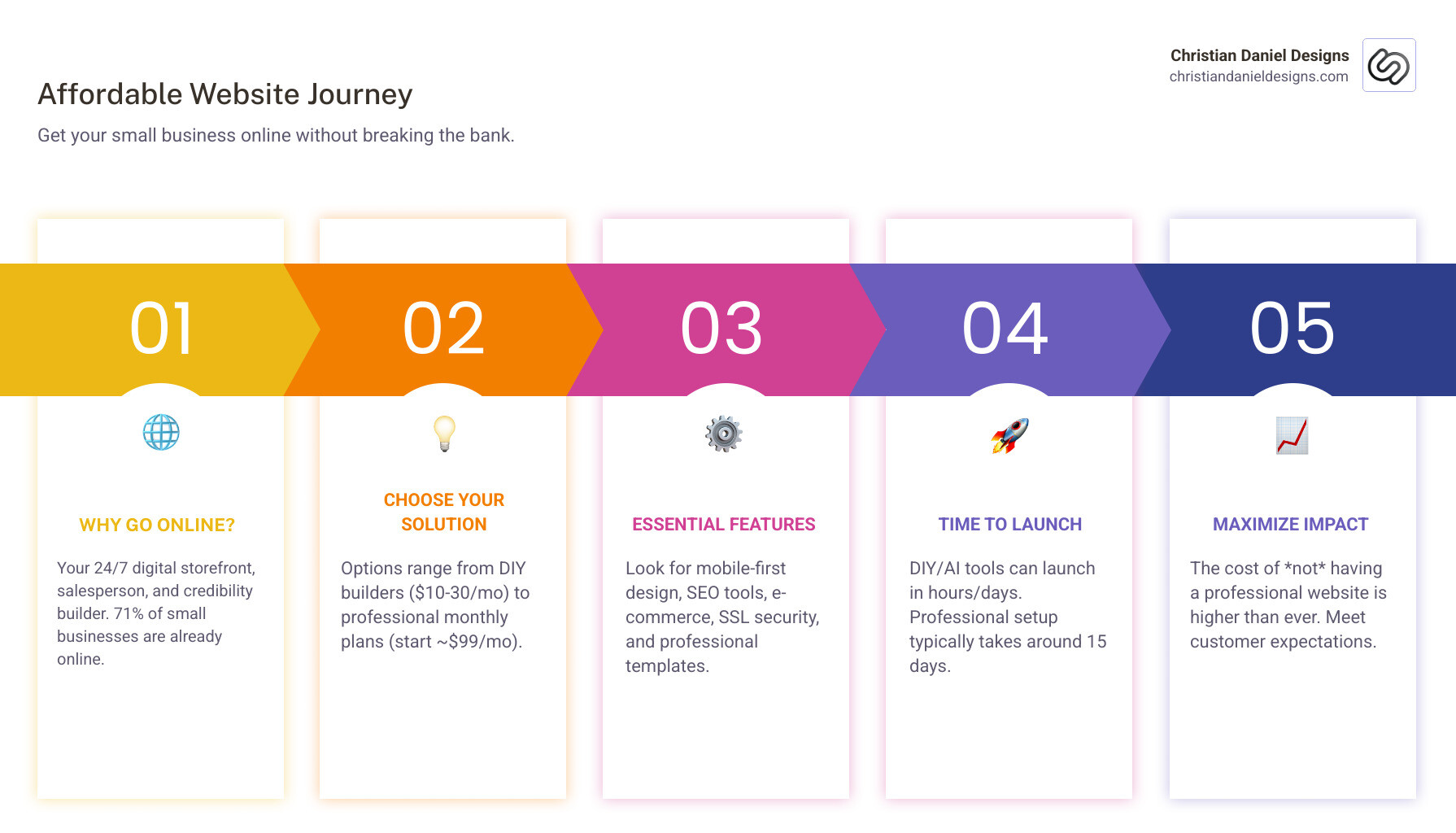
The numbers are compelling: 71% of small businesses have a website, while the rest miss out on customers who search online first.
While custom development can cost $5,000 to $10,000, you don’t need a huge upfront investment. Today’s affordable options deliver professional features—mobile-responsive design, SEO tools, e-commerce, and secure hosting—for under $30/month or through flexible payment plans.
For any business in New York City, from a Manhattan restaurant to a Brooklyn boutique hotel, getting online doesn’t have to drain your cash flow. The key is knowing which features you need and what solution fits your business.
Your competitors are online, and your customers expect to find you there. Over half of users won’t recommend a business with a poor mobile site. “Affordable” no longer means “cheap looking.” The best budget-friendly solutions now offer:
- Mobile-first design for a professional look on any device
- SEO-ready frameworks to help customers find you on Google
- E-commerce tools to sell products or accept bookings 24/7
- Security features like SSL certificates to build trust
The barrier to entry has never been lower, and the cost of not having a website has never been higher.
I’m Christian Daniel, and I’ve helped small businesses across New York City build affordable, high-performing websites that drive real results. I’ve seen how the right digital presence transforms bookings and revenue. Let me show you how to get online without breaking the bank.
What to Look For: Essential Features in a Website
An affordable small business website isn’t just about a low price; it’s about finding the sweet spot where cost meets function. A truly effective budget website needs these core features to serve your business well.

Here are the essential features your small business website needs:
- Mobile-Responsive Design: This is fundamental. With most users on their phones, your site must look and function perfectly on any device. Over half of internet users won’t recommend a business with a poorly designed mobile site.
- Basic SEO Tools: A website is useless if no one can find it. Budget-friendly platforms should provide built-in SEO tools to edit page titles, use keywords, and generate sitemaps for better search visibility. For a New York City business, local SEO is paramount.
- User-Friendly Editor: The platform should be intuitive for making updates. Drag-and-drop interfaces are standard, allowing you to add content and images without writing code, which saves time and frustration.
- Professional Templates: First impressions matter. A range of modern, industry-specific templates means you don’t have to start from scratch. They can be customized to reflect your brand and build credibility.
- E-commerce Capability (if needed): If you sell products or accept bookings, e-commerce features are non-negotiable. Look for secure payment processing, product galleries, and inventory management to turn your site into a sales engine.
- Reliable Hosting: Your website needs a home on the internet. Affordable solutions typically include hosting with high uptime guarantees (e.g., 99.9%), ensuring your site is always available.
- Website Security (SSL): An SSL certificate encrypts data and displays “HTTPS” in the browser, which builds customer trust and is a search engine ranking factor. Many affordable plans include a free SSL certificate.
- Customer Support Options: Even user-friendly platforms can be challenging. Accessible customer support via live chat or email is invaluable when you need help troubleshooting.
- AI Tools: Many affordable small business website builders now integrate AI for content generation and design suggestions. This can speed up the initial setup, though human review is always recommended.
Understanding these features is the first step. For a deeper dive, explore our Designing Small Business Website Guide.
Your Options for an Affordable Small Business Website
You have several excellent options for creating an affordable small business website, each with benefits depending on your budget, technical skill, and desired control. The goal is to balance affordability with functionality. Let’s explore the main paths: DIY builders, professional design, and AI-powered tools.

The DIY Route: Pros and Cons of Website Builders
DIY drag-and-drop builders are appealing for their low cost and quick setup. With plans ranging from free to $10-$17/month for more features, you can launch a basic site in hours. However, consider the trade-offs:
Pros:
- Low Initial Cost: Free plans exist, and paid plans are much cheaper than hiring a designer.
- Quick Setup: Templates and intuitive editors get you online fast.
- User Control: You can make updates and changes anytime.
Cons:
- Builder Branding: Free plans often include ads, which can look unprofessional.
- Limited Customization: Unique designs or complex functions may be restricted without coding.
- Hidden Renewal Costs: Low introductory rates can jump significantly upon renewal.
- Learning Curve: Mastering a new platform takes time away from your core business.
- Feature Lock-ins: Essential tools might be locked behind expensive plans. Free plans are not ideal for professional sites.
For a deeper dive into navigating these platforms, check out our More on low-cost builders.
The Professional Touch: Finding an affordable small business website designer
Hiring a professional designer traditionally meant a high upfront cost, a major barrier for small businesses. However, the landscape has changed, especially for businesses in New York City.
Pros of Professional Design:
- Expert Design: Get a custom-designed website that drives bookings and boosts brand credibility.
- Saves Time: You focus on your business while we handle the technical work.
- Built-in SEO Strategy: Professionals integrate SEO best practices from the start.
- Ongoing Support: Many services offer life-time support, including updates, hosting, security, and maintenance.
Cons (Traditionally):
- Higher Upfront Cost: This used to be the main barrier.
The Solution: Monthly Design Plans
To counter the high upfront cost, you can opt for monthly website design plans. For example, a professional design and setup might cost a one-time fee of $999, followed by a manageable monthly fee (e.g., $99) covering hosting, security, updates, and support. This model makes professional-grade web design accessible, and your new affordable small business website can be live in about 15 days!
To learn more about finding the right expert, read our guide on How to Find a Web Designer for Small Business.
Leveraging AI Tools for your affordable small business website
AI is changing web design, offering faster, more accessible ways to create an affordable small business website. These tools are now integrated into many modern builders.
How AI Tools Help:
- AI for Content Generation: AI can generate text for your site based on brief prompts, helping overcome “blank-page paralysis.”
- AI for Design Suggestions: AI builders can generate a full website design—layout, color scheme, and content—from a simple text prompt.
- Speeding Up the Creation Process: AI significantly reduces the time to get a functional website online, doing the heavy lifting in minutes.
- Content Enrichment: AI can suggest new sections, pages, and product descriptions to make your site more comprehensive.
While powerful, AI-generated content still requires human review to ensure it aligns with your brand. However, for a small business, AI tools provide an excellent starting point.
For more insights into integrating AI into your web presence, explore our resources on AI-powered website creation and Web Design for Business Owners.
Tailoring Your Site: Key Considerations for Different Business Types
An affordable small business website isn’t one-size-fits-all. The ideal site for a Manhattan restaurant will differ from a Brooklyn consultant’s. It’s crucial to prioritize industry-specific functionality over pure aesthetics.
E-commerce and Retail Stores
For businesses selling products or services online, your website is your virtual storefront. Robust e-commerce capabilities are paramount.
Key features to prioritize:
- Secure Payment Processing: Non-negotiable for integrating with trusted payment gateways.
- Inventory Management: Tools to track stock and manage product variants.
- Product Galleries: High-quality images and clear descriptions to showcase your offerings.
- Shipping and Tax Tools: Automated calculations to streamline checkout.
- No Transaction Fees: Some platforms offer e-commerce features without charging transaction fees, a significant cost-saver.
An affordable small business website for e-commerce can start with basic plans that include these features. For a comprehensive guide, refer to our Custom Website Small Business Guide.
Service-Based Businesses (Consultants, Salons)
If your business relies on appointments, your website should make booking easy. For service providers in New York City, convenience is key.
Essential features include:
- Online Booking Systems: Allow clients to view availability and book appointments directly, integrating with tools like Calendly.
- Service Menus: Clearly list your services, pricing, and descriptions.
- Client Testimonials: Build trust by showcasing positive feedback.
- Contact Forms: Simple forms for inquiries so potential clients can easily reach you.
These features turn your website into an active client acquisition tool. For seamless scheduling, consider integrating Online appointment scheduling.
Restaurants, Hotels, and Hospitality
For the hospitality scene in New York City, a website is often the first point of contact. Your site needs to be visually appealing and functional.
Look for:
- Menu Displays: Easy-to-read, updated menus with high-quality photos.
- Online Ordering/Reservations: Seamless integration for food orders, table bookings, or room reservations.
- Photo Galleries: Showcase your ambiance, rooms, and dishes.
- Location and Hours: Clearly displayed address, map, and operating hours.
- WooCommerce Functionality: For hotels and restaurants, powerful WooCommerce functionality can drive bookings and boost brand credibility.
An affordable small business website in this sector means having these critical features without a huge development cost. Our Web Design Small Business Guide offers further insights.
Maximizing Your Investment: SEO and Marketing on a Budget
An affordable small business website is a great start, but people need to find it. This is where budget-friendly SEO (Search Engine Optimization) and online marketing come in. Many affordable builders include built-in SEO tools, and many cost-effective strategies can boost your visibility.
- On-Page SEO: This involves optimizing elements on your website, like page titles, meta descriptions, and headings, while naturally integrating relevant keywords.
- Local SEO: For businesses in New York City, local SEO is critical to appear in “near me” searches.
- Google Business Profile: This free tool is your best friend. Claim and optimize your profile with accurate info, photos, hours, and encourage customer reviews.
- Consistent NAP (Name, Address, Phone): Ensure your business details are consistent across your website, Google Business Profile, and online directories.
- Content Creation & Blogging: A blog provides value, establishes your expertise, and creates new content for search engines. Answer common customer questions or discuss industry topics.
- Social Media Integration: Drive traffic to your website from your social media channels (Facebook, Instagram, etc.). Share your website content on social media to expand your reach.
- Email Marketing: Build an email list to communicate directly with interested customers. Many website builders integrate with email marketing platforms to help you capture leads.
By focusing on these strategies, you can significantly improve your online presence without a huge marketing budget. For more detailed strategies, explore our guides on Small Business Online Marketing and Small Business Video Marketing.
Frequently Asked Questions about Affordable Websites
Navigating web design on a budget can bring up questions. Here are some common ones we hear about creating an affordable small business website.
What is the cheapest way to build a website?
The absolute cheapest way is a free plan from a website builder. However, these come with significant limitations like builder ads, a non-custom domain (e.g., yourbusiness.buildername.com), and restricted features.
While great for testing ideas, free plans are generally unsuitable for a professional business. For a truly affordable small business website that looks professional, a low-cost paid plan ($10-$20/month) is a better starting point. These plans typically include a custom domain, no ads, and essential features, offering the best value.
How much should a small business website cost?
The cost varies by approach:
- DIY Website Builders: Expect to pay $10 to $30 per month for a plan with a custom domain and no ads.
- Affordable Professional Design Packages: This model offers expert design without the high upfront cost. A typical structure is a one-time setup fee (around $999) followed by a monthly fee (around $99/month) that covers hosting, security, updates, and support. This helps manage cash flow.
- Traditional Custom Website Development: Highly complex, bespoke projects can cost $5,000 to $10,000 or more.
A truly effective and affordable small business website will likely fall into the $10-$30/month (DIY) or $999 setup + $99/month (professional service) range.
Can I get a professional website for free?
In short, not really. “Professional” implies a site that represents your brand well and helps you grow, which free plans can’t deliver.
Free plans have major limitations that undermine a professional image:
- Subdomains: A generic address like
yourbusiness.freewebsitebuilder.comlooks unprofessional compared to a customyourbusiness.com. - Builder Advertisements: Ads for the website builder on your site distract visitors and hurt your brand’s credibility.
- Limited Features and Storage: You’ll miss out on e-commerce, advanced SEO tools, and sufficient storage.
- No Custom Email: You can’t get a professional email address matching your domain (e.g.,
info@yourbusiness.com).
To get a custom domain, remove ads, and access necessary features, you’ll need to upgrade to a paid plan. This small investment delivers value that quickly pays for itself through increased credibility and functionality.
Conclusion: Taking the First Step to Your Online Presence
Getting your small business online with a professional, effective, and affordable small business website is not just achievable—it’s a critical step for success in today’s digital landscape. We’ve seen that you don’t need to spend thousands of dollars upfront to establish a compelling online presence. The key lies in understanding your business’s specific needs and balancing cost with essential features.
Whether you opt for the hands-on approach of a DIY website builder, leverage the rapid deployment of AI-powered tools, or choose the peace of mind that comes with professional design through flexible payment plans, the options are more accessible than ever. Remember to prioritize mobile-responsive design, robust SEO features, and the specific functionalities that cater to your industry, be it e-commerce, online booking, or menu displays.
For businesses in New York City, particularly hotels, restaurants, and service providers, a custom, high-performance site can make all the difference in driving bookings and boosting brand credibility. We specialize in creating these custom solutions, offering powerful WooCommerce functionality and the expertise to ensure your website truly reflects your brand and meets your business goals.
Don’t let the fear of high costs deter you. Take the first step today. Explore our guide on finding the best web designers for small business to see how we can help your New York City business thrive online. Your digital storefront awaits!

